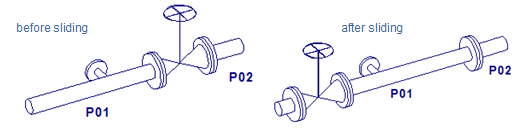
Slide

You can slide a Standard Component along the straight pipe the component is connected to. If sliding a Standard Component that has a hole request, the tool also tries to update the location of the hole request.
Do the following:
-
On the Piping tab, in the Standard Component group, click Slide.
-
Select the component you want to slide and press Enter.
-
If you are sliding a penetration, you can use the Set penetration to touching plate command to place the component so that it touches the plate that is being penetrated. This is the same location where a component is placed with the command Piping > Penetration > Insert > Penetration.
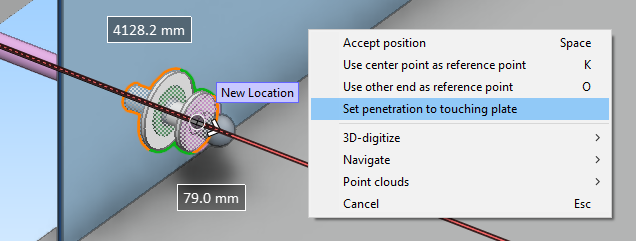
Otherwise continue as described below.
-
You can change where the reference point is located in the component with these context-menu commands:
-
Use center point as reference point (K)
-
Use other end as reference point (O)
-
-
Start sliding the component to its intended position The distances from the minimum and maximum limits are shown on the screen, and you can press Ctrl+Tab to edit either of the distance values.
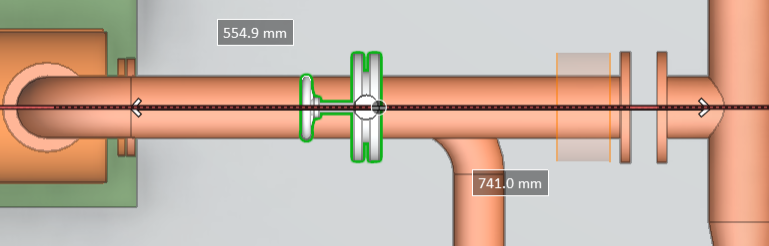
-
When the component is in its new location, press Space or click to accept the location.
-
If the new location requires a different bolt set or gasket than the previous location, you might be prompted that "you need to manually set bolt owner". This can happen, for example, if you slide a butterfly valve and place it between flanges that use different specifications. In these situations, the specification is taken from the "bolt owner" object, and if there is no bolt owner, you can use the Bolt owner: Set tool to give this role either to the component or to one of the valves, as applicable. For more information, see Flanged connections.
About sliding an inline component
Standard Components can be categorized based on the relationship that they have with the connected pipe:
-
Inline parts (valves, tees etc.)
-
Onto pipe parts (pipe supports)
-
Outlets (instrument nipples)
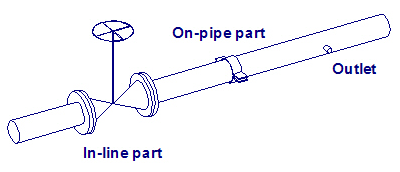
You can slide an in-line component if one of its ends is either free or connected to a straight pipe.
The lengths of the connected straight pipes limit how far you can move the component from its original position.
A straight pipe that is "overrun" must be long enough to have space for the pipe parts that are needed to close the gap that opens at the other end of the component. Information about the needed pipe parts is first obtained from the pipe that needs stretching. If the information is not available, then the overrun pipe is examined to see if it belongs to the same pipeline as the pipe that needs stretching. As the last resort, you are requested to provide the necessary information.
The picture below shows what happens if you slide a component whose neighboring pipes belong to different pipelines, and the component moves to the other side of a branch point or pipe support. If there were no branches or supports, then the pipeline assignments would stay as they were before the sliding.